
the Game
The Clipboard: Every Roll the Engine Made, Now on Screen
The 3D players came down today and the coach's clipboard went up: real floor spots, the make chance as a roll meter, a ledger of why, and every roll of every possession, with your scouts' fog on the ratings.
I'll say the quiet part first. The 3D players were lying to you. Not on purpose, and not about the score, but about what the engine was doing. When a rigged athlete took two hard dribbles and rose over a defender, none of that had been decided by anything. The engine had resolved a drive, a blow-by check, a closeout distance and a make chance. The athlete was a cartoon drawn on top of those numbers, and the cartoon implied things the sim never computed. Today that ended. Every surface that showed a game with the 3D players now shows the clipboard, and every mark on the clipboard is backed by a value the engine actually logged.
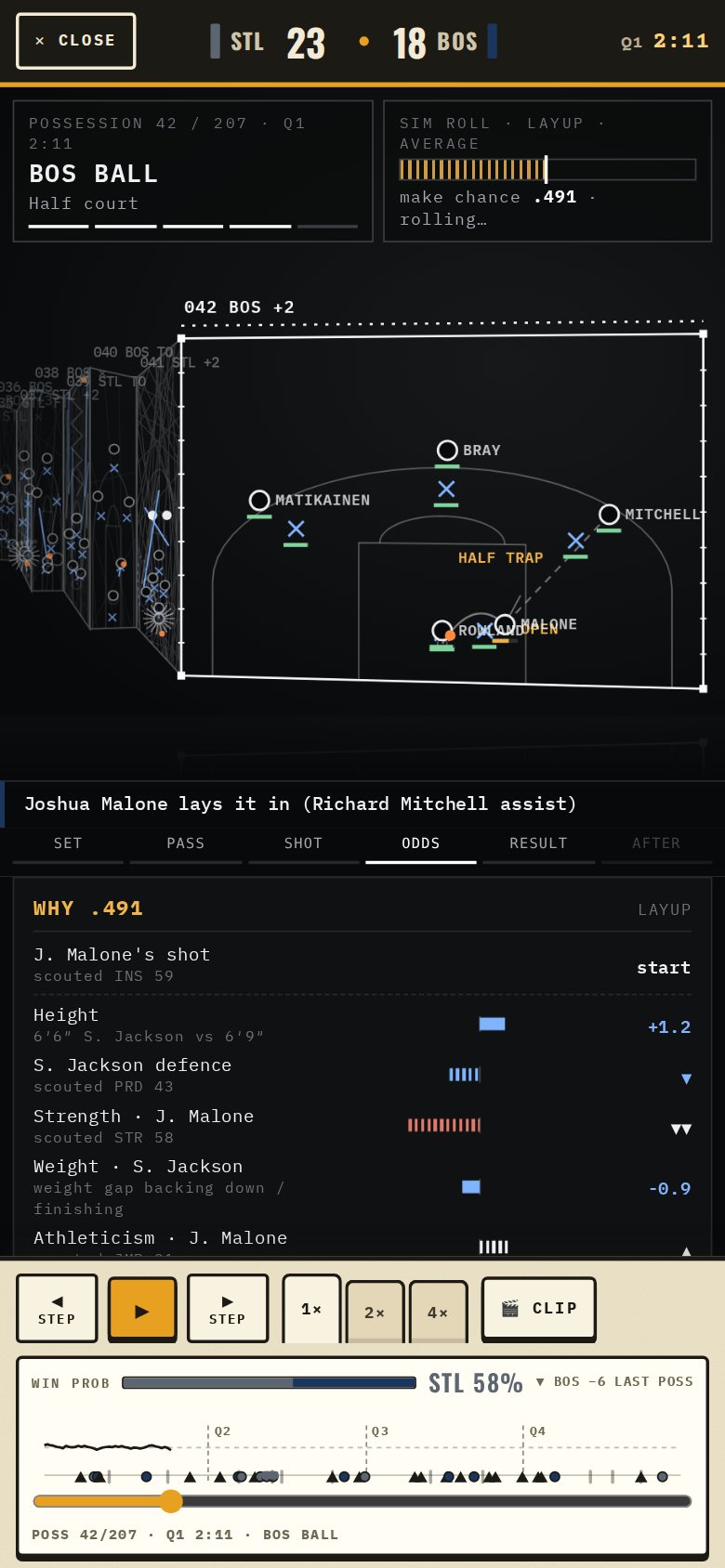
This edition is the long one. I'm going to walk every meter on the screen, roll by roll, and tell you exactly where the fog of war sits on each one. If you're a GM who reads game plans the way other people read box scores, this is for you.
What a possession looks like now
The clipboard folds. The front panel is the live possession; the panels behind it are the trips that came before, each one stamped with its number and what it produced, and the hatching on a back panel is the seconds it used. The front panel is a coach's whiteboard: O's with the ball, X's guarding them between man and rim, an orange ball, a zigzag dribble, a dashed pass, a T for a screen. The coverage the defense played is written on the floor where it happened. SWITCH, HALF TRAP, HELP, OPEN, ROTATES. Under each man sits a small green bar. That is his energy right now, on the floor, from the engine's own fatigue model.
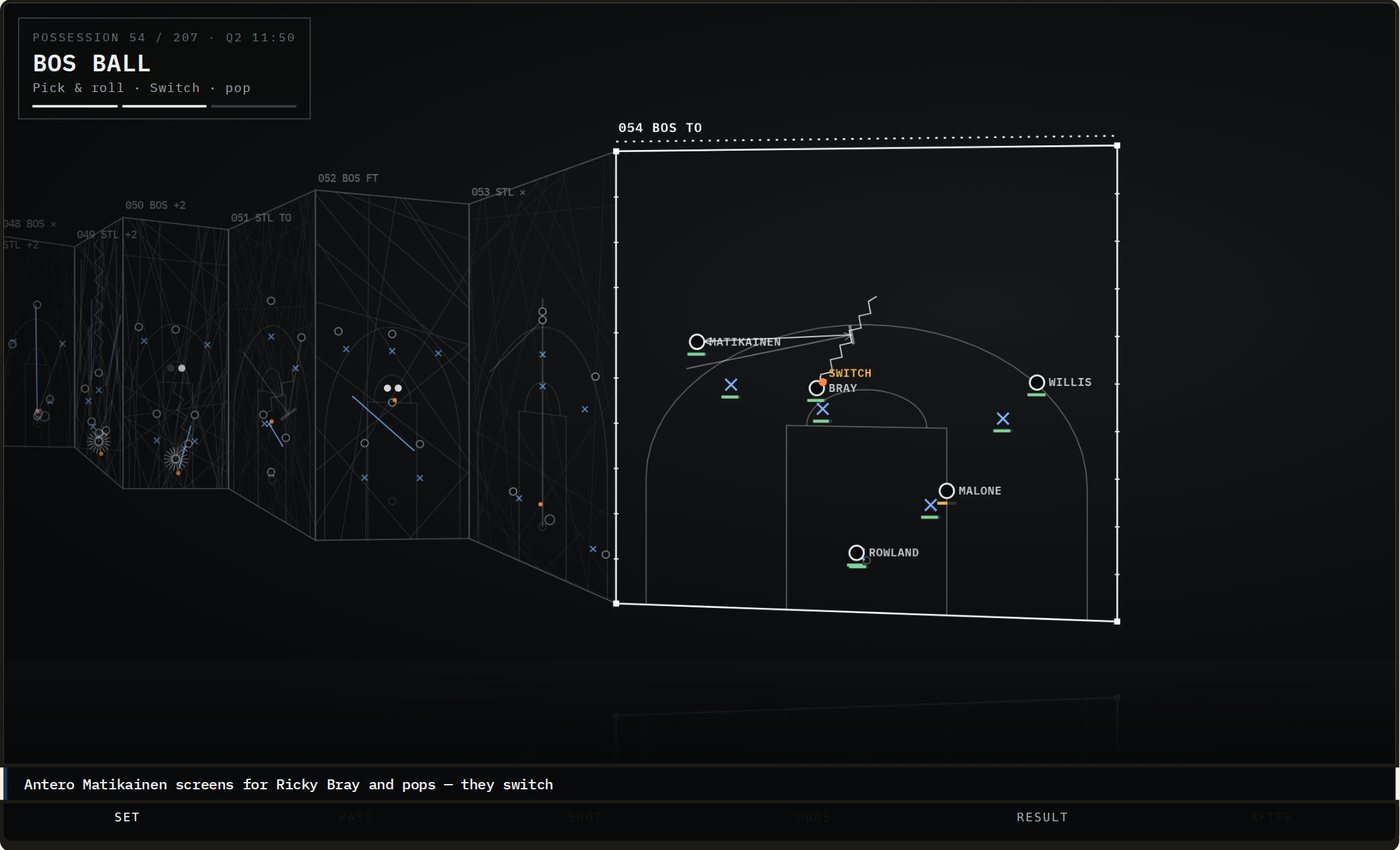
Those spots aren't drawn for effect. Since this morning the engine writes down where all ten players stood on every possession, who was matched up with whom, where the shot went up, who the nearest defender was and how far away he was when it left the hand. For games simmed before today the clipboard still draws the play from the play-by-play, but the spots are placed, not logged, and the panel says so. From today on they're real.
Every trip plays in six beats, and the tabs under the court tell you which one you're in: Set, Pass, Shot, Odds, Result, After. The pacing is slow on purpose, and it's slowest on Odds, because that's the beat where the engine shows its work.

The sim roll meter
Top right on the phone, top of the rail on a computer. One bar, one needle. The bar fills to the make chance the engine computed for this shot, from this shooter, against this defender, at this spot, in this situation. The needle is the draw: the number the engine pulled from its random stream and compared against the chance. Needle inside the bar, the shot goes in. Needle past it, the shot misses. The label on the meter is the shot-quality grade the engine put on the look.
That number is exact. It is the same number the engine used. Nobody rounds it, nobody dresses it up, and it's the same whether you're a GM, a commissioner or a visitor on a shared clip.
The Why ledger
Under the court on the phone, in the rail on a computer, the Why panel opens at the Odds beat and lists every term that moved the make chance from the shooter's starting number to the number on the roll meter.
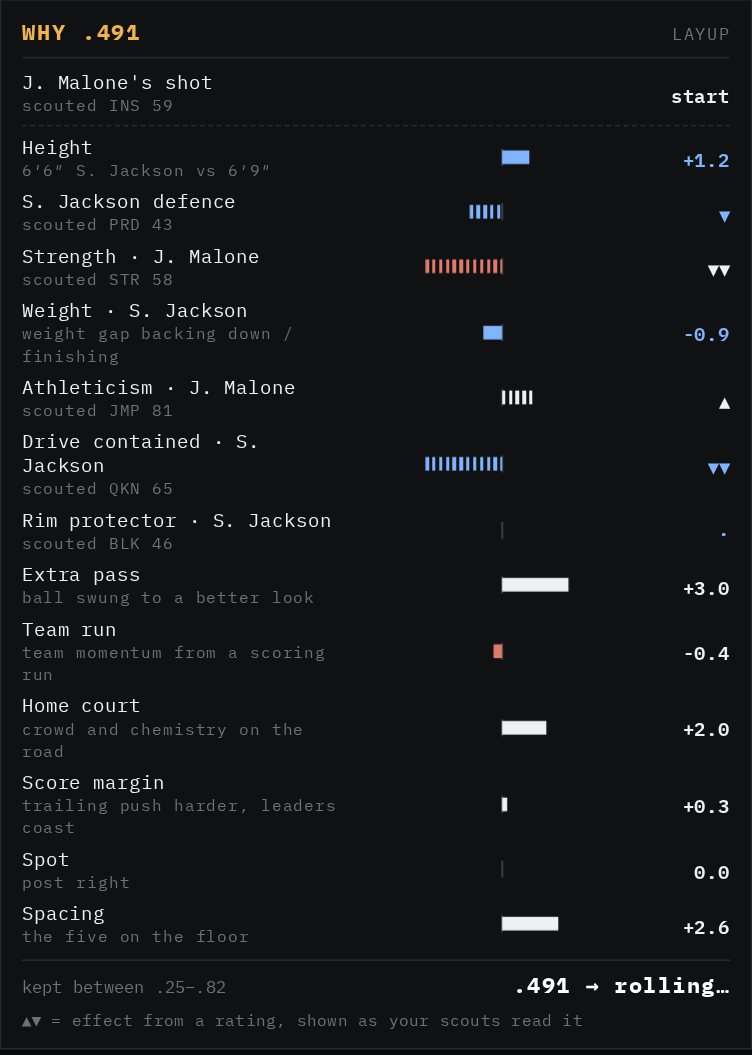
How to read it. The top row is the start: the shooter's own base for this kind of shot. Every row under it is one term, with a bar that grows right when it helped and left when it hurt. White bars are the offense's doing. Blue bars belong to the defender; his name is on the row. A plain number on the right is the exact effect in points of make chance. Height is a plain number, because height is public: six-six against six-nine is on the back of the card. Home court is a plain number. The extra pass, the team run, the score margin, the spot on the floor, the spacing of the five, the hot hand, the clutch moment, the fast break, the shot clock, the usage load: all exact, all public.
Then there are the hatched rows with a triangle instead of a number. Those are rating-driven. The defender's on-ball defense. The shooter's strength against his man's. The leaper's athleticism at the rim. Whether the drive was contained, which runs on the defender's quickness. The rim protector's block rating. The shooter's own base. For every one of those, the engine used the true rating, and the panel shows you a band instead: two up, one up, flat, one down, two down. And next to the band it prints what your scouts think that rating is. "Scouted PRD 43." "Scouted JMP 81." That read is your club's read, not the truth, and a different GM watching the same possession sees his own club's read on the same row.
This is the fog of war rule, stated once so it's clear: the odds of what happened are exact; the ratings that produced them are banded and labelled with your scouts' numbers. The engine never prints a true rating. Not on Watch, not on a clip, not on a shared link. What you learn about a player from the clipboard is bounded by what you've paid to learn about him.
The footer of the ledger shows the range the chance was kept inside, so you can see when a term pushed past what the engine considers realistic and got held back.
The rolls
Here is the part I've wanted to show you since the first column. A possession is not one roll. It's twenty to thirty-five. Pace, scheme, handler, pressure, play, action, coverage, the turnover check, the shot, the foul, the board, the break, the sub. Every one of them is a draw against a chance, and the engine now writes down all of them. They arrive in the tray as the play runs, so by the After beat you have the whole trip.
 On the phone
 In the rail
Three kinds of meter live in the tray, and a key at the top says how to read them: the gold bar is the chance, the white marker is where the dice landed, and inside the bar means it happened. A yes-or-no roll is one of those bars with a sentence under the name that says it plainly: 40% chance, rolled 28, switched scheme. 8% chance, rolled 87, no. The dice roll on a hundred, every time. A choice roll is a bar cut into segments, one per option, each as wide as its share, with the marker inside the segment that won, and the sentence names the winner with his share and the two he beat. Play type is one: three, drive, foul trip, mid. Who has the ball is one. Who rebounds is one. A value draw just prints what it drew: the pace bucket for the trip, the seconds it used off the shot clock. A roll the engine repeats inside one trip, like get back once per defender, groups into one row with a pip per roll and a count of how many came up. And rolls that were nearly certain not to happen and didn't, the technical, the press foul, the strip on the drive, fold into one line at the bottom so the tray stays readable. They're still there. Nothing is hidden.
- 1TempoPace bucket for the trip, then the seconds it will use. Two-for-one and burn-clock checks late.
- 2The defenseDefense called (a secondary scheme this trip), blown coverage, press and passing-lane checks, double team.
- 3The ballWho has it, weighted by usage. Extra pass, and to whom. The turnover check, every single trip.
- 4The actionPlay type, then the action: pick-and-roll with roll or pop and the coverage, cut, handoff, off a screen, isolation, post feed, reset.
- 5The shotBlow-by, the heat check or smart reset, block, make, shooting foul, and-one. Then the assist credit.
- 6AfterDead ball, offensive board, who rebounds, putback or kick-out, leak-out, push the pace, get back, injury check, sub now.
The fog applies to the tray the same way it applies to the ledger. A yes-or-no chance is exact, always, because it's the chance of a thing that happened or didn't. But the shares in a choice roll are built from ratings. Who has the ball runs on usage. Who rebounds runs on size and rebounding. So when the fog is on, those segments come as approximate widths, hatched, with a band on the winner, and your scouts' read where it applies. You still see who won the roll and roughly how favoured he was. You don't see the number that favoured him.
Above the rolls sit the meters the engine carries from trip to trip: the run each team is on and what it's worth, the crowd, and the trailing push, which is the engine making a team that's behind play a little harder. And when a substitution happens inside the trip, the tray says why in plain words: foul trouble, tired legs, rotation, fouled out, ejected, hurt. It prints the energy the man was at when he came out, flags it when your rotation chart made the call, and names the other players the coach weighed before choosing.
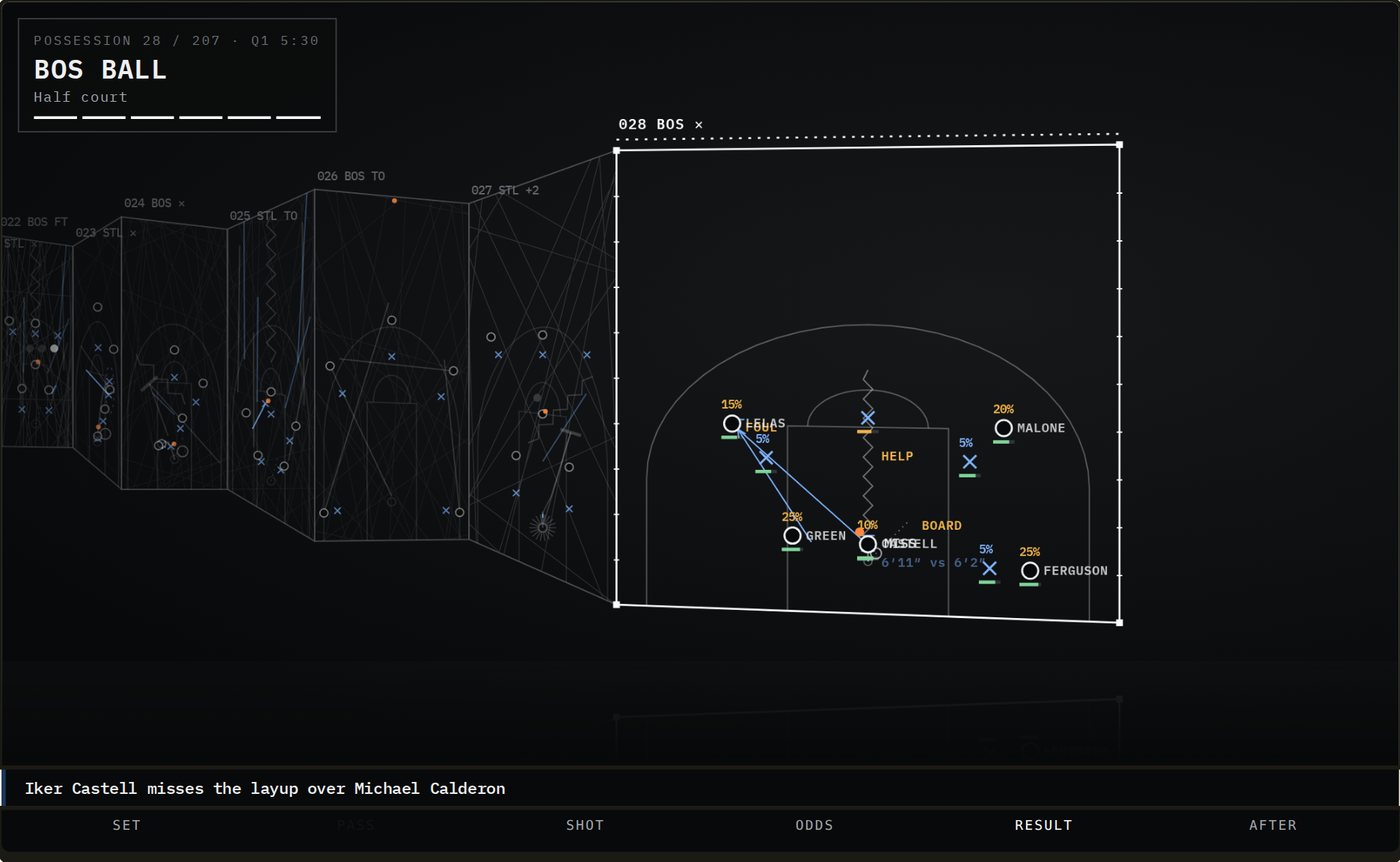
On the Result beat the clipboard draws the rebound as shares. Each man near the rim gets a percentage, the engine's own chance that he comes down with it, and the height matchup at the rim is printed on the floor. When the ball squirts to a thirty-percent guy over a fifty-percent big, you'll see that it was a thirty-percent roll, not a bug.
Why this beats the 3D players
Three reasons, in order of how much they matter.
It's true. The old view had to invent motion the engine never resolved, because the engine doesn't track limbs, it tracks decisions. Every mark on the clipboard maps to a logged value: a spot, a matchup, a coverage, a chance, a draw. If it's on the screen, it happened in the sim.
It's complete. The 3D view showed you one thing, the shot. The clipboard shows you the thirty rolls around it, the ten energy bars, the sub reasons, the run meters and the shares on the glass. The shot is the last five percent of a possession. You now get the other ninety-five.
It's light. The 3D build shipped a rigged body, a skin, a renderer and the loaders for all of it before you saw a frame. The clipboard is a few kilobytes of drawing code over the game file you were already downloading. Watch on a phone went from three and a half megabytes to under half a megabyte, and the phone's processor spends about a seventh of the time it used to. Old phones that stuttered on Watch now play it at full speed.
And nothing about the games changed. The engine logs values it was already drawing. There are no new random draws, no new terms, no retuning. A game simmed today under the clipboard produces the same box score it would have produced yesterday. The only difference is what it tells you afterward.
For the GMs who read everything
This is where the clipboard earns its keep. Every setting on your game plan is a claim about how your team will play. The tray is where you check the claim.
- 1Trap and press settingsDefense called, press steal and press foul roll every trip. Count how often your call fires and what it gives up.
- 2Rotation chartSub lines say 'rotation chart' when your chart ran, and 'tired legs' with the energy when it didn't hold.
- 3UsageWho has the ball is a choice roll. Your star's segment is the one you set. If it isn't the widest, your plan isn't doing what you think.
- 4Shot dietPlay type shows three, drive, foul trip and mid as shares. Compare them to the diet on your game plan.
- 5Heat and IQThe heat check gate and the smart reset show when a hot hand forced a bad look and when a high-IQ player passed one up.
- 6ScoutingThe reads beside each band are yours. Scout a defender and the next clipboard reads him tighter.
Set a half-court trap and watch Defense called roll trip after trip; you'll see how often it fires and what it costs when it doesn't. Paint a rotation chart and read the sub lines; when the engine says "rotation chart," your chart ran, and when it says "tired legs" at forty percent energy, your minutes were too heavy for that man. Push your usage to one star and watch Who has the ball; his segment is the wide one. Run a shooter who's heating up and watch the Heat check gate; the hot hand gets you a bonus and a bad shot in the same breath, and the tray shows both.
Your scouting budget is now a reading budget. A club that has scouted a defender well sees a tighter read beside his band and can judge whether the two-down on Drive contained is the man or the moment. A club that hasn't sees a wide read and a guess. That's deliberate. Information is a resource in this league, and the clipboard spends it the same way the rest of the game does.
The same clipboard runs everywhere a game is shown. The clip you share into League chat is a clipboard with the top two factors drawn in. The deciding plays on your Dash are picked by swing and drawn as data, not as highlights. In 1 on 1, the Why panel reads as the payoff of the call you just made and the call they made against it. In Atlas on a computer, the game stage is the clipboard. Public clip pages carry bands only, never a read, because a visitor has no scouts.
- 1Sit on OddsPause a shot on the Odds beat and read the ledger top to bottom before you press play.
- 2Find a turnoverScrub to one of yours. The tray shows the lane, the pressure, the handle and the chemistry rolls that produced it.
- 3Watch a subOpen the After beat on a stoppage. The reason, the energy and the men the engine weighed are all there.
- 4Clip itShare a possession into League chat. The clip carries the top two factors, banded, so the argument comes with evidence.
One honest note on timing. Games simmed before today show the shot facts the play-by-play always had: chance, shot, spot, quality, contest, pass. The full ledger, the real floor spots and the rolls start with games simmed from today. Give it one sim night and open Watch.
“The shot is the last five percent of a possession. You now get the other ninety-five.”
Open any possession. Sit on the Odds beat. Read the rows. For the first time, the game is showing you the game.
— Dr. Possession