
the Game
Faster Pages, Coaching Templates, and a Depth Chart That Fits
The game got quicker on desktop and phone, your depth chart learned eighteen real coaching philosophies built from your own lineups, and the Sheet view now fits on one screen.
Three things landed this week, and you'll feel all three before you read about them. The game is quicker on desktop and on your phone. Your depth chart learned how eighteen real coaches ran their rotations, and it builds each one out of your own lineups. And the Sheet view of the depth chart now fits on one screen, so you can drag the twelfth man to the top without scrolling.
Faster, everywhere
Speed was the theme of the week. We measured every step a page takes, from the moment you click to the moment you can use it, and went after the slow parts one at a time. The idea comes from the fastest catalog website on the internet: don't make people wait for anything they didn't ask for.
On desktop, moving between pages now fetches only the part of the page that changes. The menus, the Messenger and the ticker stay where they are. Hover over a link or press it and the next page starts loading before you let go, so most clicks land in about a fifth of a second. Going Back to a page you just saw is close to instant. The Messenger starts loading about a second sooner, and it no longer flashes the phone layout first.
Between sims, the game now remembers the parts of a page that are the same for everybody, like standings, schedules and team sections, and it hands them out again until something actually changes. On our test setup that cut the server time for the Dash from about 305 milliseconds to under 200, and roughly halved My Team, the depth chart and the schedule. The pages are identical either way. We checked that, byte for byte.
On the phone, the bottom bar now paints with the first frame, instead of popping in a second or more after the page. The Team and Coaching menus start loading their pages while you're still choosing (on Android), the player card loads once per page instead of two or three times, and Back from a Messenger thread is more reliable on iPhone. Holding Messenger or the Dash now lifts its bubble above your thumb, so you can see what you're about to open.
- 1Lean page swapsDesktop fetches only the part of a page that changes, and keeps your last pages ready for Back.
- 2Pre-loadingPages start loading on hover or press, and only pages that are safe to load early.
- 3Remembered sectionsBetween sims, shared parts of pages are kept and handed out again until something changes.
- 4Phone first frameThe bottom bar and its look load first, so the page is usable sooner.
Templates: eighteen ways to run a rotation
Next to AI Suggest on the depth chart there's a new button: Templates. It opens eighteen rotations from real coaches, in three groups.
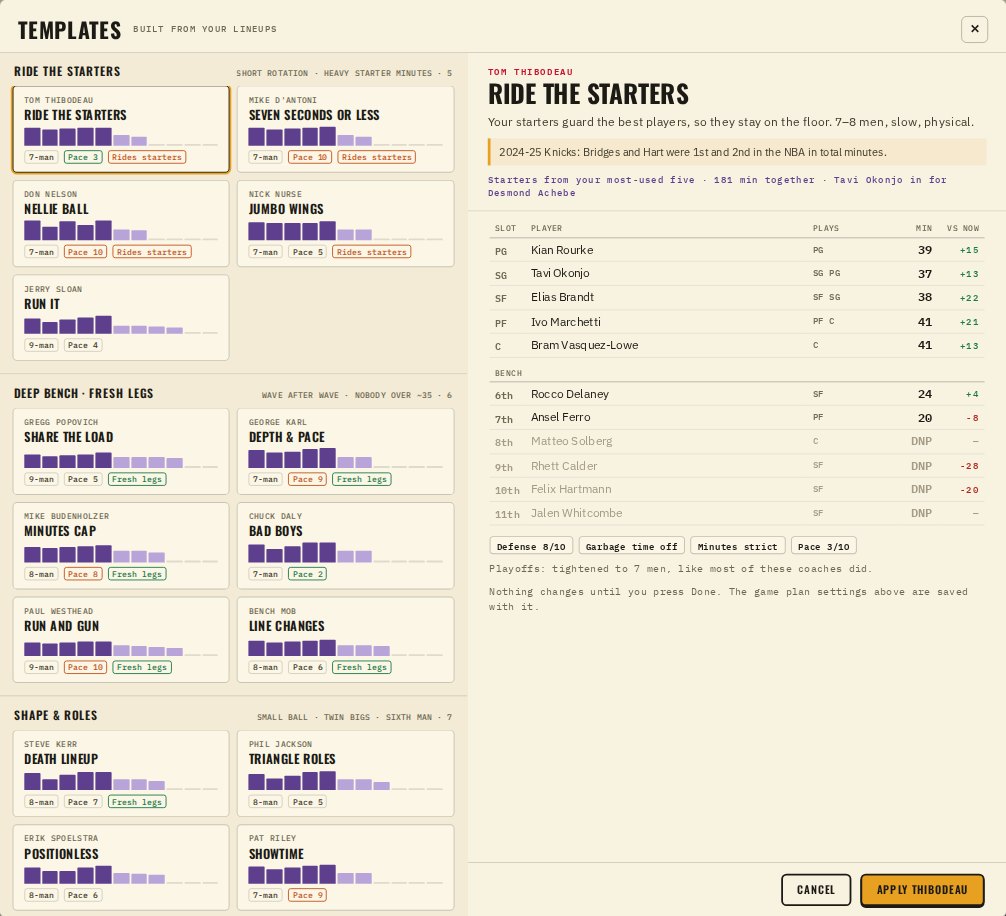
These aren't presets. Every template is built from your team's own lineup data this season. Thibodeau starts the five you've played together the most. Kerr starts your best five by net rating, then tells you to close games small. Nellie Ball goes looking for your best small five. If one player from that five is hurt, the next man up at his spot steps in, and the template says who.
Two rules hold for all of them. Your best players always start, because no coach in history benched his best player to make a point. And every player's positions are set for you: the tight-rotation coaches keep players at their natural spots, and the small-ball coaches let them cover every spot the game allows. The game uses those positions all night, for every sub and for who closes.
- 1Your fives firstMost-used, best net, best offense, best defense, best small, best two-big or most three-happy, depending on the coach.
- 2Best players startAlways. Stand-ins cover a hurt starter at his own spot.
- 3The coach's minutesShapes from the seasons each coach became known for, inside the game's minute limits.
- 4Positions and game planPlays chips set for every player, plus the pace and minutes rules that fit the coach.
A fun one from the research: Don Nelson's teams were the fastest in the league, but his stars played more than forty minutes a night. If you want fast and fresh, that's George Karl, or Paul Westhead at the extreme. That's why Karl and Westhead live in the deep-bench group and Nelson rides his starters.
 Pick a coach
 See it, then Apply
Applying a template doesn't save anything. It puts the rotation into your depth chart in edit mode, so you can look it over, change whatever you like, and press Done. The matching game plan settings, like pace and how strictly minutes are kept, save with it. The rest of your plan stays as you set it. In the play-in and playoffs, every template tightens the bench by a man or two, because that's what almost all of these coaches did.
The Sheet view fits on one screen
The Sheet view is the spreadsheet version of your depth chart, every player in one grid, built for dragging. It had a problem: on most screens the bottom of the list sat below the fold, so moving the twelfth man meant scrolling while dragging.
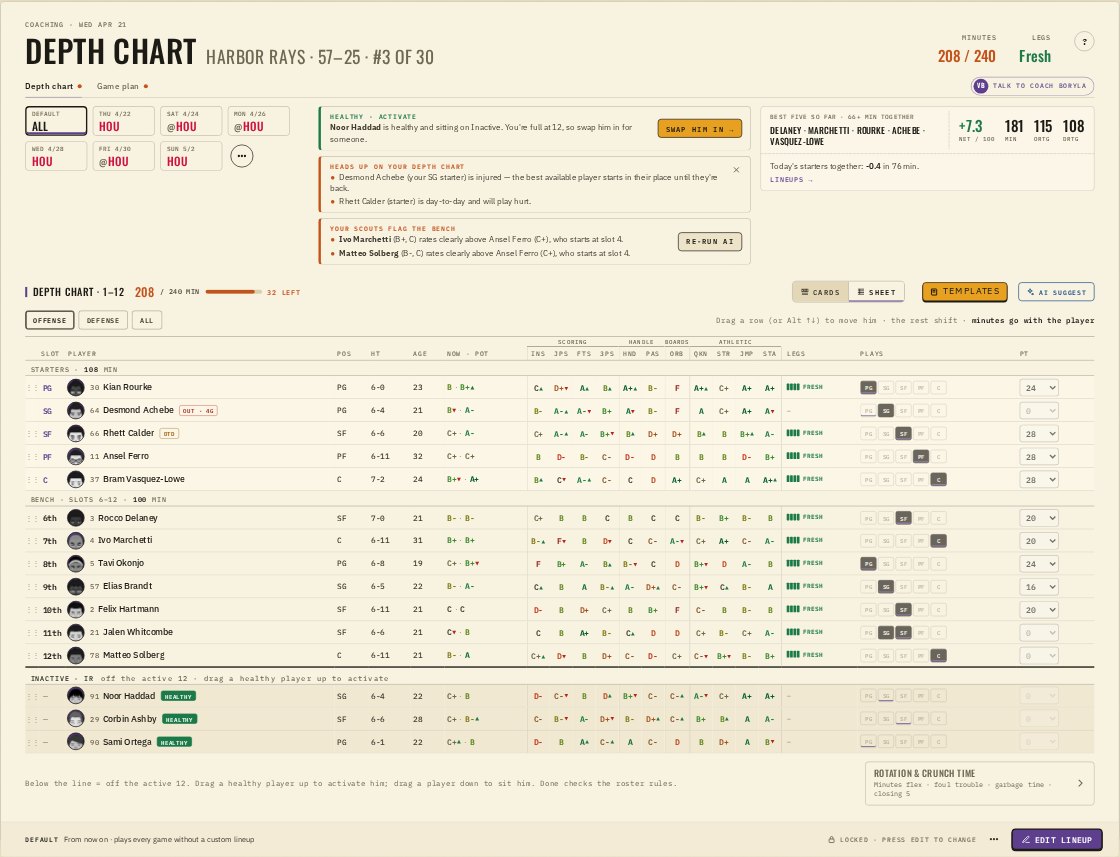
Now the Sheet view sizes itself to your screen, with the Messenger open or closed. Rows one through twelve and the players below the line are all visible at once. The game chips, the scouts' notes and Best five sit side by side in one band at the top instead of stacking, so the table starts higher. And in the Cards view, your starters now have the same Plays chips as the bench, so you can let your point guard cover the two without opening his card.
- 1Open TemplatesRead three coaches' versions of your team before you change anything.
- 2Compare the 'vs now' columnIt shows exactly whose minutes go up or down against your current chart.
- 3Use the Sheet for big movesDrag from the bottom of the list to the top without scrolling.
- 4Set positions on startersIn Cards, the Plays chips under each starter let him cover more than his slot.
“Every coach has a philosophy. Now your roster gets to try all of them.”
Try a coach you'd never hire. Then try the one you would. You'll learn something about your roster either way.
— Dr. Possession